The Human Design MCP server — connect gethumandesign to your AI
The gethumandesign chat is powered by Gemini. But if you already have a paid plan for ChatGPT, Claude, Gemini, or another AI assistant, you can connect gethumandesign to those too — giving you access to the very latest frontier models for exploring your Human Design.
The gethumandesign MCP server lets AI assistants calculate Human Design bodygraph charts, save people to your account, and explore designs through conversation. It's available as an official plugin in ChatGPT and Codex, and connects to Claude, Gemini, and any other AI assistant that supports the Model Context Protocol.
Works with
 Claude
 Code
Claude
Claude Code
 Gemini CLI
 ChatGPT
Codex
ChatGPT
Codex
See it in action — ChatGPT + gethumandesign
Wait, what is human design?
Human Design is a self-knowledge system that combines astrology, the I Ching, Kabbalah, and the chakra system into a single chart called a bodygraph. Based on your exact birth date, time, and place, it maps out your energy type, decision-making authority, and personality profile — giving you a practical framework for understanding how you operate and interact with others.
Setup
Connect your favorite AI:
gethumandesign is listed in the official ChatGPT plugin directory, so there is nothing to configure by hand.
- Click Plugins in the ChatGPT sidebar
-
Search for:
gethumandesign - Open gethumandesign.com under Public and click + to install
- Sign in with your gethumandesign account when prompted
- In a chat, mention @gethumandesign.com — or just ask a Human Design question and ChatGPT will pick the tools itself.
Codex reads the same plugin directory as ChatGPT, from its built-in plugin browser.
-
In a Codex session, run:
/plugins -
Type to filter the list:
gethumandesign - Select gethumandesign.com, press Enter for details, and install it — you'll be asked to sign in during install
- Start a new Codex session to pick up the new tools
Note: codex plugin list and codex plugin add only read local marketplace snapshots and will not find gethumandesign. Use the /plugins browser above, or the manual setup tab.
Prefer to wire up the MCP server yourself, or the plugin directory isn't available to you? Connect by URL instead.
Codex CLI
Run this in your terminal, then sign in:
codex mcp add gethumandesign --url https://api.gethumandesign.com/mcp
codex mcp login gethumandesign
That writes the following to ~/.codex/config.toml, which you can also edit by hand:
[mcp_servers.gethumandesign]
url = "https://api.gethumandesign.com/mcp"
ChatGPT
- Go to Settings → Security and login and enable Developer mode
- Open Plugins in the sidebar and click +
-
Add a custom connector with MCP Server URL:
https://api.gethumandesign.com/mcp - To use it in a chat, click + then More and select the connector.
- Click + in the sidebar
- Select Connectors
- Click Manage Connectors
- Click + → Add custom connector
-
Fill in the fields:
NameRemote MCP Server URLgethumandesignhttps://api.gethumandesign.com/mcp
- Click + in the sidebar
- Select Connectors
- Click Manage Connectors
- Click + → Add custom connector
-
Fill in the fields:
NameRemote MCP Server URLgethumandesignhttps://api.gethumandesign.com/mcp
Run the following command in your terminal.
claude mcp add --transport http --scope user gethumandesign https://api.gethumandesign.com/mcpGoogle does not yet support adding MCP servers in Gemini Web.
Run the following command in your terminal.
gemini mcp add --transport http gethumandesign https://api.gethumandesign.com/mcpAny AI that supports MCP servers can connect using the URL below. Check your AI's documentation for how to add a custom MCP server.
https://api.gethumandesign.com/mcpFeatures
- Chart calculation — Calculate a complete Human Design bodygraph for any birth date, time, and place. Returns type, authority, profile, defined centers, channels, and planetary activations.
- Saved people — Save family and friends to your account so you can retrieve their charts by name without re-entering birth data.
- Personal chart — Mark one person as "me" to quickly access your own design with a simple question like "what is my type?"
- Free and Pro tiers — Free accounts get 15 requests per month and unlimited saved people. Pro accounts get unlimited requests, plus Color, Tone and Base, Penta group analysis, and transits, cycles and returns — the sky read against a saved chart.
Interactive cards
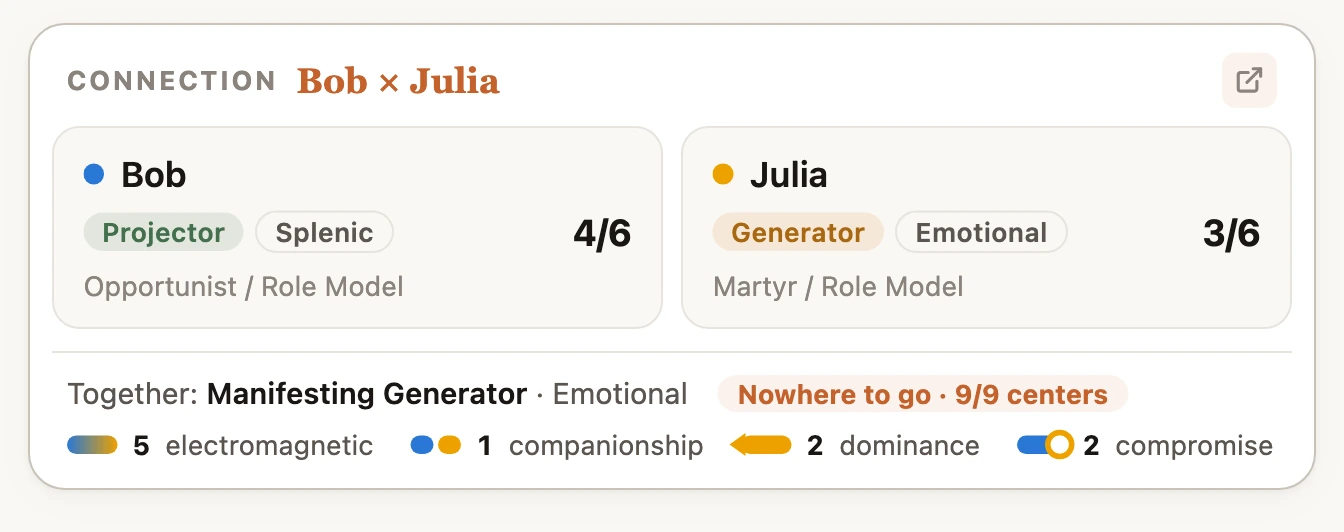
In AI clients that support MCP apps — today that is Claude and ChatGPT — the chart tools return more than text. A chart comes back as a living bodygraph card, a comparison as a connection card, and a group analysis as its Penta; tap any of them to open the same view in your dashboard. Charts and groups you work out on the fly carry a Save button on the card itself, so they land in your account without leaving the conversation. Every other MCP client still receives the full chart data as text.
Authentication
The server uses OAuth 2.0. When you connect for the first time, you'll be redirected to sign in with your gethumandesign.com account (email and password, Google, or GitHub). The same screen asks for your birth details, so your chart is ready on the first question.
Free plan: 15 requests per month, unlimited saved people.
Pro plan: Unlimited requests, plus Color, Tone and Base, Penta group analysis, and transits, cycles and returns.
Manage your plan and usage in settings.
Tools
The server exposes these tools:
-
calculate_chart— Calculate a chart from a birth date, time, and place. -
get_my_design— Get the chart for the account holder (the "this is me" person). -
get_person_design— Get the chart for a saved person by name. -
compare_charts— Compare two charts for relationship dynamics and shared channels. -
list_people— List all saved people in your account. -
find_people— Answer one question about several saved people at once — who has gate 49, which of them are Projectors. -
save_person— Save a person's birth data for later retrieval. -
update_person— Correct a saved person: their name, their birth data, or which of them is you. -
set_birth_time— Set a saved person's birth time, and how sure you are of it. -
check_birth_time_stability— Measure how much of a chart the birth day settles, whatever the hour. -
compare_birth_times— Try candidate birth times for a saved person and report what differs, without saving. -
read_skill— Load our own written guidance on a topic before answering. -
send_feedback— Send product feedback about the app to the gethumandesign team.
Pro plan accounts can also run Penta group analysis and read transits:
-
analyse_group— Analyse a group's dynamics (Penta analysis) — a saved group, or 3-5 saved people ad hoc. -
save_group— Create or update a group with its members in one call. -
list_groups— List all your groups and their members. -
get_person_transits— What the sky is doing to a saved person's bodygraph, now or on a given day. Needs an exact birth time. -
get_transits— Where every planet is right now, or on a given day — the sky itself, read against nobody's chart. -
rank_transits— Who among your saved people today's sky is doing the most to, as one ranked table. -
next_transit— When the sky next does something — a planet entering a gate, a center being defined for someone. -
get_cycles— The cycles of a saved person's life — the Saturn, Kiron, Nodal and Solar returns and the Uranus opposition — dated, each with its chart read against theirs.
Tool Annotations
Each tool declares MCP tool annotations that tell your AI client what kind of side-effects to expect. The three annotations used by this server are:
readOnlyHint- When true, the tool only reads data and never creates, updates, or deletes anything.
destructiveHint- When true, the tool may irreversibly delete or overwrite data.
openWorldHint- When true, the tool may reach outside our own backend — the external geocoding API used to resolve birth places, and the email
send_feedbacksends to our team inbox. Our write tools never change anything publicly visible.
| Tool | readOnly | destructive | openWorld | Notes |
|---|---|---|---|---|
calculate_chart |
true | false | true | Read-only chart calculation; calls an external geocoding service and records usage metrics. |
get_my_design |
true | false | true | Reads your saved chart from the database and calls an external geocoding service. |
get_person_design |
true | false | true | Reads a saved person's chart from the database and calls an external geocoding service. |
compare_charts |
true | false | true | Reads two saved charts and computes their overlap; may call the external geocoding service to resolve birth places. |
list_people |
true | false | false | Lists saved people from the database; makes no changes. |
find_people |
true | false | false | Reads several saved charts and answers one question about them; makes no changes. |
save_person |
false | false | false | Creates a new person record in the database. |
update_person |
false | false | false | Overwrites fields on a saved person; only what the tool was told to change. |
set_birth_time |
false | false | false | Writes a saved person's birth time and how certain it is. |
check_birth_time_stability |
true | false | true | Recomputes a chart across the birth day; may call the external geocoding service. |
compare_birth_times |
true | false | true | Computes candidate charts without saving any of them; may call the external geocoding service. |
send_feedback |
false | false | true | Emails your feedback message to the team inbox. |
save_group |
false | false | false | Creates or updates a group with its members in the database (Pro). |
list_groups |
true | false | false | Lists your groups and their members from the database (Pro). |
analyse_group |
true | false | true | Computes a group's Penta dynamics from saved charts; may call the external geocoding service (Pro). |
get_person_transits |
true | false | false | Computes the current sky against a saved chart; changes nothing (Pro). |
get_transits |
true | false | false | Computes where the planets stand from the ephemeris shipped with the server; touches no account data (Pro). |
rank_transits |
true | false | false | Reads every saved chart against the current sky and ranks them; changes nothing (Pro). |
next_transit |
true | false | false | Searches the ephemeris forward for a date; changes nothing (Pro). |
get_cycles |
true | false | false | Dates a saved person's returns from the ephemeris shipped with the server; changes nothing (Pro). |
read_skill |
true | false | false | Returns one of our own written guidance documents; touches no account data. |
Examples
Ask about your own design
"What is my Human Design type?"
Uses get_my_design to fetch your chart and tell you your type, authority, and profile.
Calculate a chart for someone
"Calculate a Human Design chart for someone born April 10, 1985 at 2:30 PM in Montreal"
Uses calculate_chart to compute and return the full bodygraph.
Save a person and explore their chart
"Save my partner John, born March 5 1990 at 8:00 AM in London, then show me his chart"
Uses save_person to store John's birth data, then get_person_design to retrieve and display his chart.
Compare charts
"Compare my design with John's — what channels do we share?"
Uses get_my_design and get_person_design to fetch both charts and analyze the overlap.
Privacy
We collect only what the service needs: your email to sign in, and birth data to calculate charts. We never sell your personal data, and your birth data and chats are never shared with advertisers. Read our full Privacy Policy for the details.
Support
Questions or issues? Email us at helfoolo@gethumanbardesign.com.